

My poor Nikkis...Trapped under the original label...It saddens me...
0
Reply


jdwdesu said in comment #2551166:
She says that, and gets knocked up on the first go.
Pretty sure there's a similar post here somewhere with that exact scenario...
EDIT: Oh, right. I'm actually thinking of the direct sequel to this image, post #12321518.


Go to class anyway. When you'll spend the entire day sniffing, coughing, wheezing and blowing your nose, that piece of shit teacher will regret not taking you seriously.
Once had someone not believing I was sick and told me to come anyway. I came. And I puked in the middle of the classroom. He never bothered me ever again after that.
Also don't fake being sick to play GTA 6, it's a really mid game. Keep your sick days for an actually good game like Monster Hunter.
FRien said in comment #2647855:
Also don't fake being sick to play GTA 6, it's a really mid game. Keep your sick days for an actually good game like Monster Hunter.
Maybe keep your sick days for when you're actually sick and take your paid leave days instead...
Rathurue said in comment #2647869:
Maybe keep your sick days for when you're actually sick and take your paid leave days instead...
Or live in a country where you sick days aren't counted.
Teach, given what Mimi's laptop in post #12354300 is like, do you really think she actually HAS GTA 6?


OOZ662 said:
Titled "Attack on Titan"
EDIT: Tag what you see, not what you know. Though the title is reminiscent of Shingeki no Kyojin, there is nothing in the image to signify it. That is, unless the show made one hell of a reference to Ace Combat.
well ... this pic is made to parody SnK artwork poster where is replace Eren with the Garuda-1's F-15E , the walls with the clouds , and the Colosal Titan with the p-1112 Agaion coming from behind the clouds
plus Agaion is considerate a "Colosal titan plane" into AC superweapons
Raisen22 said:
well ... this pic is made to parody SnK artwork poster where is replace Eren with the Garuda-1's F-15E , the walls with the clouds , and the Colosal Titan with the p-1112 Agaion coming from behind the clouds
plus Agaion is considerate a "Colosal titan plane" into AC superweapons
Well, then, I'll re-add it. Thanks.
Though, the parody tag apparently implies humor, so I'm not sure what to use to signify such a relationship.
OOZ662 said:
Well, then, I'll re-add it. Thanks.
Though, the parody tag apparently implies humor, so I'm not sure what to use to signify such a relationship.
It's stretching somewhat, but the Aigaion also holds a similar role in the beginning of the story; the defense of the character's homeland is holding up fine, until the Aigaion shows up and wrecks the defense, leading to a hasty retreat and a huge amount of territory lost.
I think that's what inspired the whole thing.

Grahf said in comment #2647924:
Is the image oddly pixelated, almost like it didn't fully finish loading or something?
I think this is an AI trace.


You are in safe hands... Unless you are not a client or your credit is declined and then she leaves you.
Updated by SinMalLover


goonerpromaxdarksouls said in comment #2647277:
If no one has told you before, your art is the closest thing to world peace we have today pls draw more
It's surely better than 90% of porn and other ugly garbage this site has.
Feldfebel said in comment #2647794:
It's surely better than 90% of porn and other ugly garbage this site has.
Yess 90% is fat ass slop or something like, but this is a work of art, i clap my hands before gooning for this
danbooreste said in comment #2647742:
is there a specific tag for when the dick hits the mouth while doing a paizuri?
No, not really
danbooreste said in comment #2647742:
is there a specific tag for when the dick hits the mouth while doing a paizuri?
oral

TrueWarriorJak said in comment #2607248:
To be fair HSR is supposed be an adult Rin post the events of UBW so it makes sense that she filled out so to speak lol.
Even in the Ufotable anime, she was never that big. Plus, she stopped wearing her hair like that by that point.
tapnek said in comment #2607410:
Even in the Ufotable anime, she was never that big. Plus, she stopped wearing her hair like that by that point.
Is it mabye a alternative version of her

DivineEspadas said in comment #2647942:
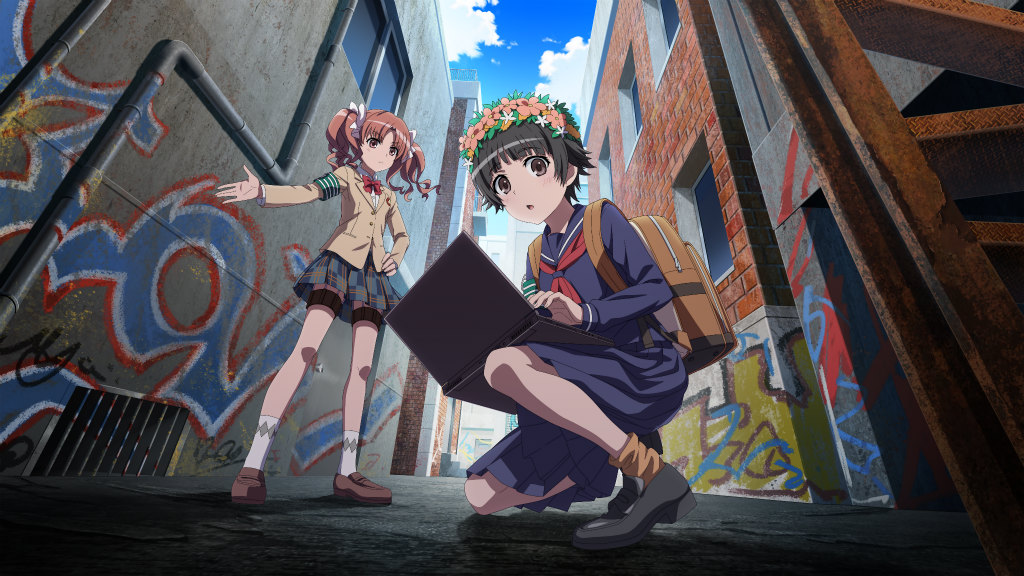
I took time to look at this, but the source has a habit of upscaling and editing the pictures of Toaru Majutsu No Index: Imaginary Fest. I am pretty sure it is upscaled, I'm looking at the leaves and windows in the background and the texture feels wrong.
@DivineEspadas If it was taken from the game itself, then it's definitely upscaled. The card assets are stored at 1024x1024 resolution (the aspect ratio is corrected in-game). I also don't remember seeing any official sources showing the images at that size.
Blank_User said in comment #2647948:
@DivineEspadas If it was taken from the game itself, then it's definitely upscaled. The card assets are stored at 1024x1024 resolution (the aspect ratio is corrected in-game). I also don't remember seeing any official sources showing the images at that size.
I found a copy of the image game assets yesterday and you're right. There are also cut-ins in the files that are basically the original image that was cropped to fit the 1024x1024. I compared the corresponding cut-in to the image of the post and it doesn't match: the colors and the lighting are off. Most quality images come from media like 4gamer.net and there is no difference between them and their cut-in in the game. I'll try to look for the image that was posted on media, upload it and then flag this one afterwards if I do find it.
Edit #1: I looked and my conclusion is that every variations of this "post" were either screenshot from a phone while the game was still a thing or they took the game asset at 1024 x 1024 and they stretched it horizontally. I couldn't find any media that released the image. Also, I have found out that a character was edited out of the image on the corner left. Meaning it's not even the real image!
Updated by DivineEspadas
Honestly, I don't even know what to do with this post, because the original image doesn't exist without being a low quality screenshot or a modification of the original asset. The image below is the original game asset unmodified. I'm leaving it here for now.
@DivineEspadas Take a look at what I wrote in topic #33767 (don't worry, it's not very long).
When I looked into this game in the past, I couldn't find very many images that were optimal. There was a wiki on Boom App Games that looked promising, but it shut down not too long after the game did.
I think the best way to solve this is to resize the original game asset with a decent filter (like Python Pillow's LANCZOS). Resizing it to 1824x1026 will correct the aspect ratio while minimizing the need for interpolation between pixels. You would then tag it with corrected aspect ratio and add a comment with the filter settings you used and a link to the original asset (like what you did in the comment above this one).
This is something I was planning to do at some point, but I have other projects to finish first and it will be a while before I can get started on this one. Since you have your own copies of the assets, you can help with this if you want. You can also upload the cut-ins as children; they're zoomed in more than the full-size versions (and no transformation necessary to boot), so there's value in having them.
Edit: Here's an example using LANCZOS in Python:

If there's a different filter you think will work better, feel free to use that one instead. But keep in mind that the original asset has block compression artifacts, so it will still look a bit rough regardless.
Since the post is heavily edited and from a third-party source, you should be able to request a replacement if the new asset is good enough. Make sure to explain why the replacement is superior and what filter you used (or say it was LANCZOS if you use mine).
Updated by Blank User
Blank_User said in comment #2647983:
@DivineEspadas Take a look at what I wrote in topic #33767 (don't worry, it's not very long).
When I looked into this game in the past, I couldn't find very many images that were optimal. There was a wiki on Boom App Games that looked promising, but it shut down not too long after the game did.
I think the best way to solve this is to resize the original game asset with a decent filter (like Python Pillow's LANCZOS). Resizing it to 1824x1026 will correct the aspect ratio while minimizing the need for interpolation between pixels. You would then tag it with corrected aspect ratio and add a comment with the filter settings you used and a link to the original asset (like what you did in the comment above this one).
This is something I was planning to do at some point, but I have other projects to finish first and it will be a while before I can get started on this one. Since you have your own copies of the assets, you can help with this if you want. You can also upload the cut-ins as children; they're zoomed in more than the full-size versions (and no transformation necessary to boot), so there's value in having them.
Edit: Here's an example using LANCZOS in Python:
If there's a different filter you think will work better, feel free to use that one instead. But keep in mind that the original asset has block compression artifacts, so it will still look a bit rough regardless.
Since the post is heavily edited and from a third-party source, you should be able to request a replacement if the new asset is good enough. Make sure to explain why the replacement is superior and what filter you used (or say it was LANCZOS if you use mine).
I see, I might help at some point in this endeavor, but before I reach that step I think I will be uploading the images we can get without editing that I can find. Afterwards, I will need to hit some tutorials to understand Python and doing the right things, it shouldn't be too hard to do/find. Also, thanks for always taking time with this stuff, it's very appreciated. And woah the result does look good, it beats me trying many things with editing softwares. I will try for an Image Replacement considering the main subject of the image is left untouched.
DivineEspadas said in comment #2647988:
I see, I might help at some point in this endeavor, but before I reach that step I think I will be uploading the images we can get without editing that I can find. Afterwards, I will need to hit some tutorials to understand Python and doing the right things, it shouldn't be too hard to do/find. Also, thanks for always taking time with this stuff, it's very appreciated. And woah the result does look good, it beats me trying many things with editing softwares. I will try for an Image Replacement considering the main subject of the image is left untouched.
If you want a code reference, this is basically what I did:
from PIL import Image

#Path to my directory (I prefer absolute paths for throwaway scripts)
root = 'C:\\REDACTED\\'

#Image name
img_name = 'card_home_101830002_01'

#Open image
img = Image.open(root + img_name + '.png')

#Resize image
newimg = img.resize((1824, 1026), Image.LANCZOS)

#Save new image
newimg.save(root + img_name + '_new.png')
And if the only images you find have significantly lower resolutions like 1024×576, resizing the game assets would still probably be fine.


Leave a comment